


I have recently installed the new Virtual box 7.0 version into my machine and exported my old guest machine into it.
If you are encountering the same issue of not being able to connect to a Nat Network. Here is a possible fix you can use.
If you click on the current virtual machine in your virtual box. In my case I have my Kali Linux 2020.2

If you try to select the current machine and click on settings on the top right menu.
You then need to click on the Network tab on the left menu panel.
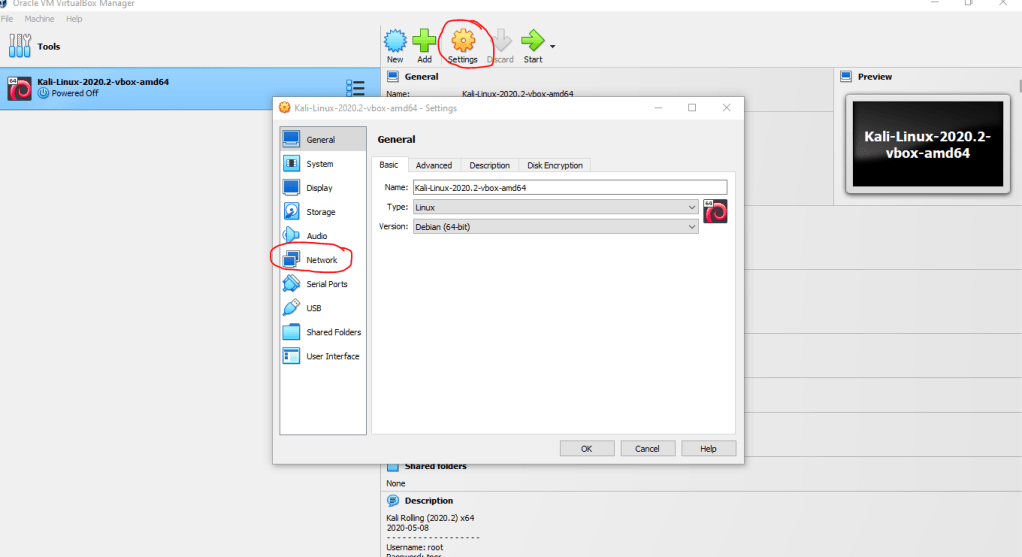
If you see that when you select the “Attached to:” option for a NAT Network and the “Name:” drop down menu doesn’t have anything selected. It means we will need to create a new Nat network to connect to.


If you have used Virtual box before. You might be confused because before we use the “Preferences” option to setup a Nat Network in the Network Manager. But now it has been moved to the “Tools” sub-menu in the Virtual Box 7.0 version.

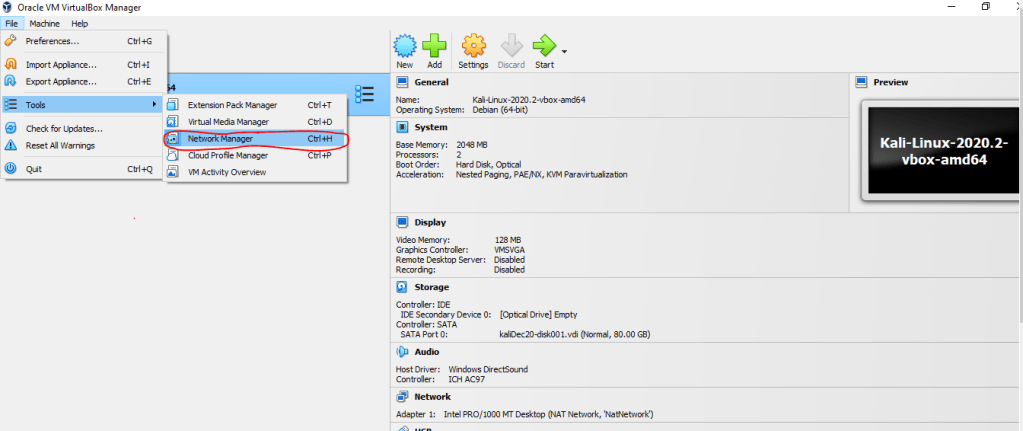
If you see that you don’t have any NatNetwork setup in your NAT Network’s tab. You will need to click on the Create button for Virtual box to create a new NatNetwork that will be available for you to use.
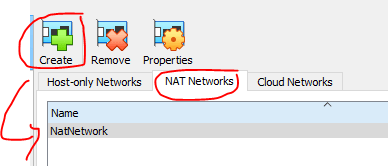
This should now fix our internet issue concern if you are not able to connect to the internet using your virtual box machine.



 Rodrigo Bonzerr Lopez
Leave a comment